

AI Prompt Template For Image Generation: Best Guide
Below is an AI prompt template and guide for generating beautiful and realistic images.
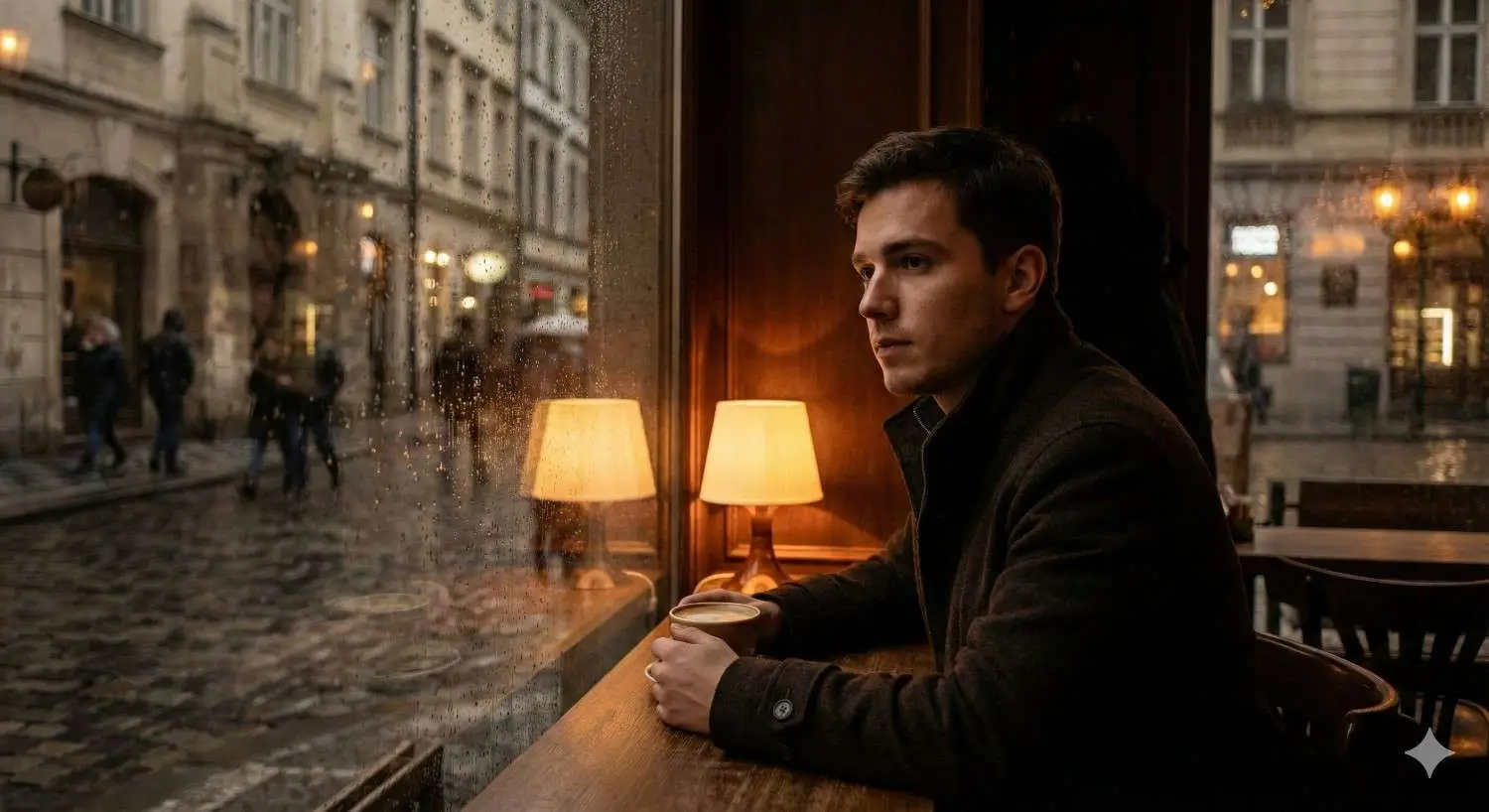
This image was generated using the prompt template below
Prompt:
“Ultra-realistic [subject] in [setting/environment], captured with [camera type & lens], using [lighting style] lighting.
Scene includes [key visual elements], with [mood/atmosphere] ambience.
Skin texture / material texture rendered in extreme detail (pores, micro-textures, surface imperfections).
Colors are [color palette] with natural depth, accurate shadows, and true-to-life reflections.
Shot at [time of day], with [weather/conditions] affecting the scene subtly. Style inspired by [photographer/artist reference – optional].
High-resolution cinematic realism, 8K, hyper-detailed, razor-sharp focus, natural DOF, photorealistic rendering.”
Add-Ons (paste after the main prompt):
Camera & Lens Enhancers:
“Shot on 50mm f/1.4 full-frame DSLR, shallow depth of field.”
“Professional studio setup with diffused softbox lighting.”
“HDR capture, perfect exposure balance.”
Realism Enhancers:
“True skin translucency, realistic subsurface scattering.”
“Accurate materials: metal reflections, fabric fibers, glass refraction.”
“Natural imperfections (dust, wrinkles, fingerprints, tiny scratches).”
Atmospheric Enhancers:
“Air particles visible with backlighting.”
“Soft fog diffusion.”
“Cinematic bloom highlights.”
Understanding the Prompt Template (Explained Simply)
The goal of the template is to help you describe an image the same way a photographer or movie director would. Realistic images come from clear direction, not complicated words.
Let’s break it down.
1. [Subject] — What the image is about
This is the main focus of the picture.
Examples:
“a samurai woman”
“an old man reading a newspaper”
“a futuristic motorcycle”
“a bowl of ramen”
⦿ Tip: Be specific. “A woman” is vague. “A woman in battle armor” is clear.
2. [Setting / Environment] — Where it is happening
This gives the AI context. Without a setting, the image becomes generic.
Examples:
“a neon-lit Tokyo alley”
“a beach at sunset”
“a cozy library”
⦿ Think: Where is the subject right now?
3. [Camera Type & Lens] — Helps realism
This makes your image look like a real photograph.
Examples:
“50mm lens” ➜ natural-looking portraits
“wide-angle lens” ➜ great for landscapes
“macro lens” ➜ close-up details
⦿ You don’t need to know photography. Just pick the vibe:
Portrait ➜ 50mm or 85mm
Landscape ➜ 24mm or 16mm
Close-up ➜ macro
4. [Lighting Style] — Changes the mood
Lighting changes everything in realism.
Examples:
“soft warm lighting” ➜ cozy
“harsh dramatic lighting” ➜ intense
“neon lighting” ➜ futuristic
⦿ If stuck, just say: “natural lighting” — it always works.
5. [Key Visual Elements] — Extra details
These are things in the background or surrounding the subject.
Examples:
“fog drifting between buildings”
“reflections on wet pavement”
“books stacked everywhere”
⦿ These add realism by making the scene feel “lived in.”
6. [Mood / Atmosphere] — The emotional feeling
This tells the AI how the scene should feel.
Examples:
“calm and peaceful”
“mysterious and eerie”
“bright and energetic”
⦿ This prevents the image from looking random.
7. [Color Palette] — What colors dominate the image
Realistic images often follow a color theme.
Examples:
“deep blues and neon pinks”
“earthy browns and greens”
“gold and black”
⦿ If you skip this, AI might mix too many colors.
8. [Time of Day] — Strong realism booster
Examples:
“morning light”
“sunset glow”
“midnight shadows”
⦿ Lighting changes depending on the time — this adds authenticity.
9. [Weather / Conditions] — Real-world effects
Examples:
“light rain”
“misty air”
“sunbeams breaking through clouds”
⦿ This adds texture and atmosphere.
10. Optional: Artist or Photographer Reference
This is for people who want a specific style.
Examples:
“inspired by Annie Leibovitz”
“inspired by Blade Runner cinematography”
⦿ Skip it if you want a neutral look.
11. Realism Boosters (Final Add-Ons)
These terms improve clarity and sharpness.
Terms that help:
“hyper-detailed textures”
“8K resolution”
“natural depth of field”
“accurate shadows”
⦿ These don’t change the scene — they just polish it.
How to Build Your Own Prompting System (Beginner Method)
Just follow these steps:
STEP 1: Pick your subject
➜ “a young man sitting by a window”
STEP 2: Choose a setting
➜ “inside a dim cafe at night”
STEP 3: Pick lighting
➜ “warm soft lighting from the lamp”
STEP 4: Add 2–3 visual details
➜ “raindrops on the window, reflections on the glass”
STEP 5: Pick a mood
➜ “lonely, thoughtful mood”
STEP 6: Choose a color theme
➜ “amber and deep brown tones”
STEP 7: Time of day & weather
➜ “nighttime during light rain”
STEP 8: Add realism boosters
➜ “8K, photorealistic, shallow depth of field”
Now you have:
“Ultra-realistic young man sitting by a window inside a dim cafe at night, captured with a 50mm lens, using warm soft lighting.
Scene includes raindrops on the window and reflections on the glass, with a lonely, thoughtful mood.
Colors are amber and deep brown tones.
Shot at nighttime during light rain.
8K, photorealistic, shallow depth of field, hyper-detailed textures.”
AI Informed Newsletter
Stay informed on the fastest growing technology.
Disclaimer: The content on this page and all pages are for informational purposes only. We use AI to develop and improve our content — we love to use the tools we promote.
Course creators can promote their courses with us and AI apps Founders can get featured mentions on our website, send us an email.
Simplify AI use for the masses, enable anyone to leverage artificial intelligence for problem solving, building products and services that improves lives, creates wealth and advances economies.
A small group of researchers, educators and builders across AI, finance, media, digital assets and general technology.
If we have a shot at making life better, we owe it to ourselves to take it. Artificial intelligence (AI) brings us closer to abundance in health and wealth and we're committed to playing a role in bringing the use of this technology to the masses.
We aim to promote the use of AI as much as we can. In addition to courses, we will publish free prompts, guides and news, with the help of AI in research and content optimization.
We use cookies and other software to monitor and understand our web traffic to provide relevant contents, protection and promotions. To learn how our ad partners use your data, send us an email.
© newvon | all rights reserved | sitemap